WP Recipe Maker Review for Food Bloggers

Disclosure: This post may include affiliate links. As an affiliate, I earn from qualifying purchases. See our Affiliate Disclosure.
What I learned after using WP Recipe Maker on my own recipe blog

Jump to:
Hey friend. If you are a food blogger, your recipe card is not just decoration. It is the heart of your post.
It's what readers print, what Google reads. And, it is what helps your recipes show up in rich results.
When I first started blogging, I only cared about how my recipes looked. I did not think much about structured data or SEO. However, as my blog grew, I realized that formatting and functionality mattered just as much as pretty photos.
That is when I started paying attention to my recipe plugin.
I have been using WP Recipe Maker on my own food blog for the past year. During that time, I have seen how much easier it makes recipe formatting, schema markup, and overall organization.
Instead of manually styling ingredients and instructions, I now use a structured recipe card that:
• Adds recipe schema automatically
• Creates clean and customizable recipe cards
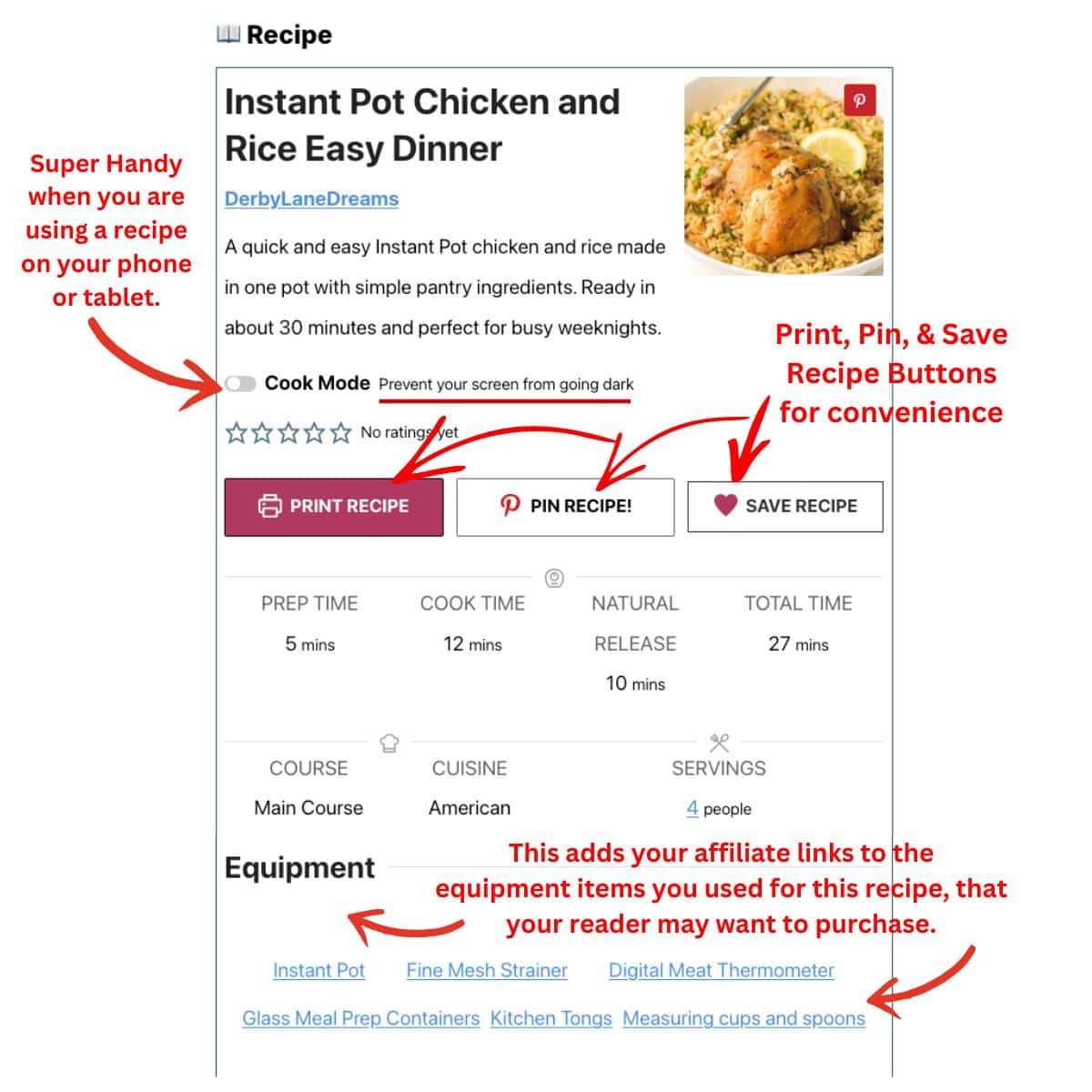
• Includes print and jump to recipe buttons
• Supports ratings and ingredient scaling
In this review, I will walk you through what WP Recipe Maker actually does, how it performs for SEO, what I love, what I would improve, and whether it is truly worth the investment for growing food bloggers.
If you are trying to decide whether WP Recipe Maker is right for your blog, this guide will help you make that decision with confidence.
👉🏽 Explore WP Recipe Maker for your food blog
Why Food Bloggers Need a Recipe Plugin
If you are serious about growing a food blog, a recipe plugin is not optional. It is essential.
When you publish a recipe without proper structured data, Google cannot fully understand your content. That means you may miss out on rich results like star ratings, cook time, and ingredient lists showing directly in search.
That extra information in Google search is powered by recipe schema. And you cannot create proper recipe schema just by formatting your post nicely.
A recipe plugin handles that automatically.
But SEO is only part of the story.
Food bloggers also need:
• A clear print recipe button
• A jump to recipe button
• Proper ingredient formatting
• Nutrition information
• Servings adjustment
• Reader ratings
Without a recipe plugin, all of that becomes manual, messy, or inconsistent.
One of my older recipes had plain text ingredients. After converting it to WP Recipe Maker, it immediately looked cleaner and easier to follow. The instructions were clearer. The layout felt more professional. And readers could finally print it without scrolling through the entire post.
When I look back at my older posts before I used a proper recipe card plugin, they were harder to read, harder to print, and not optimized for search.
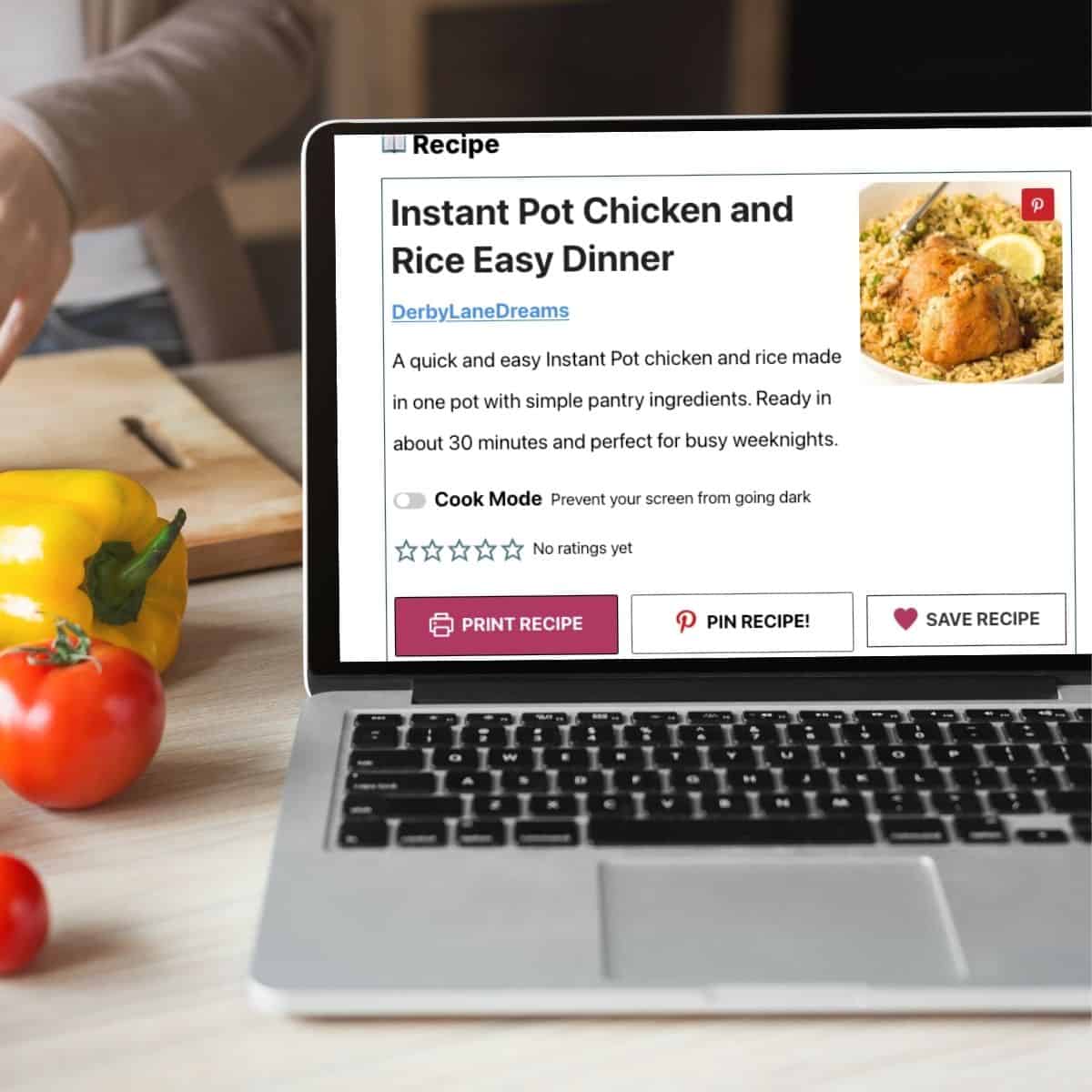
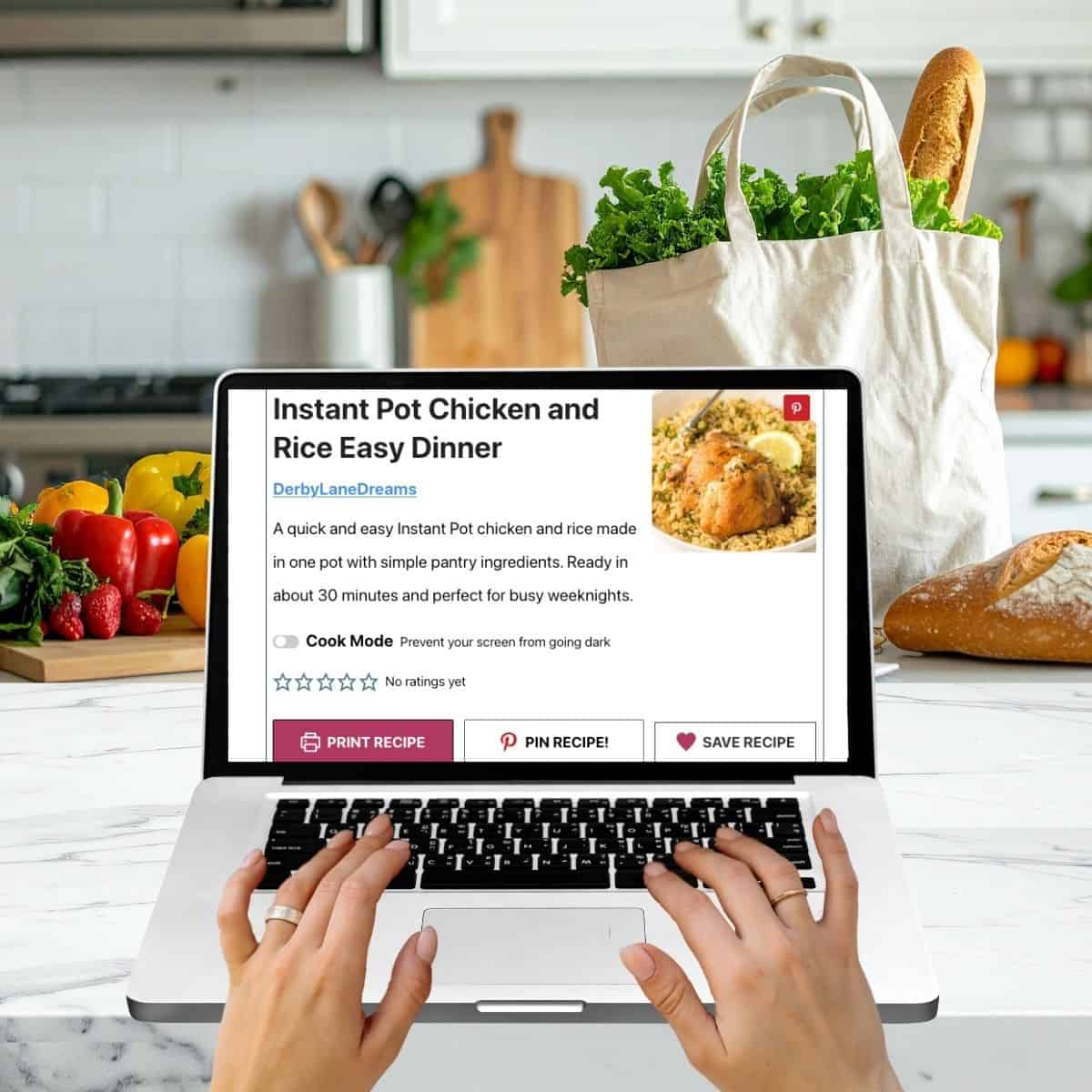
Once I installed WP Recipe Maker, my recipe posts felt more structured and professional. Readers could quickly jump to the recipe, print it cleanly, and see all the details they needed in one place.
And behind the scenes, Google could clearly understand that it was a recipe.
That matters more than most new food bloggers realize.
If you want your recipes to compete in search results and provide a smooth experience for readers, a recipe plugin for WordPress is one of the most important tools you can install.
What WP Recipe Maker Actually Does
At its core, WP Recipe Maker is a recipe card plugin for WordPress that turns your regular blog post into a fully structured recipe.
Instead of typing ingredients in plain text, you build your recipe inside a recipe card block. The plugin then formats everything neatly for readers and adds recipe schema markup for Google behind the scenes.
Here is what it actually handles for you.
1. Structured Recipe Schema
This is the big one for SEO.
WP Recipe Maker automatically adds structured data for recipes. That includes:
• Ingredients
• Instructions
• Cook time
• Prep time
• Total time
• Nutrition information
• Ratings
• Author name
This structured data helps your recipe qualify for rich results in Google search. That means star ratings, cook time, and other details can show directly in search results.
You do not have to code anything. It happens automatically when you use the recipe card.
2. Customizable Recipe Card Design
The plugin gives you different recipe card layouts. You can control:
• Colors
• Font sizes
• Button styles
• Image placement
• Equipment lists
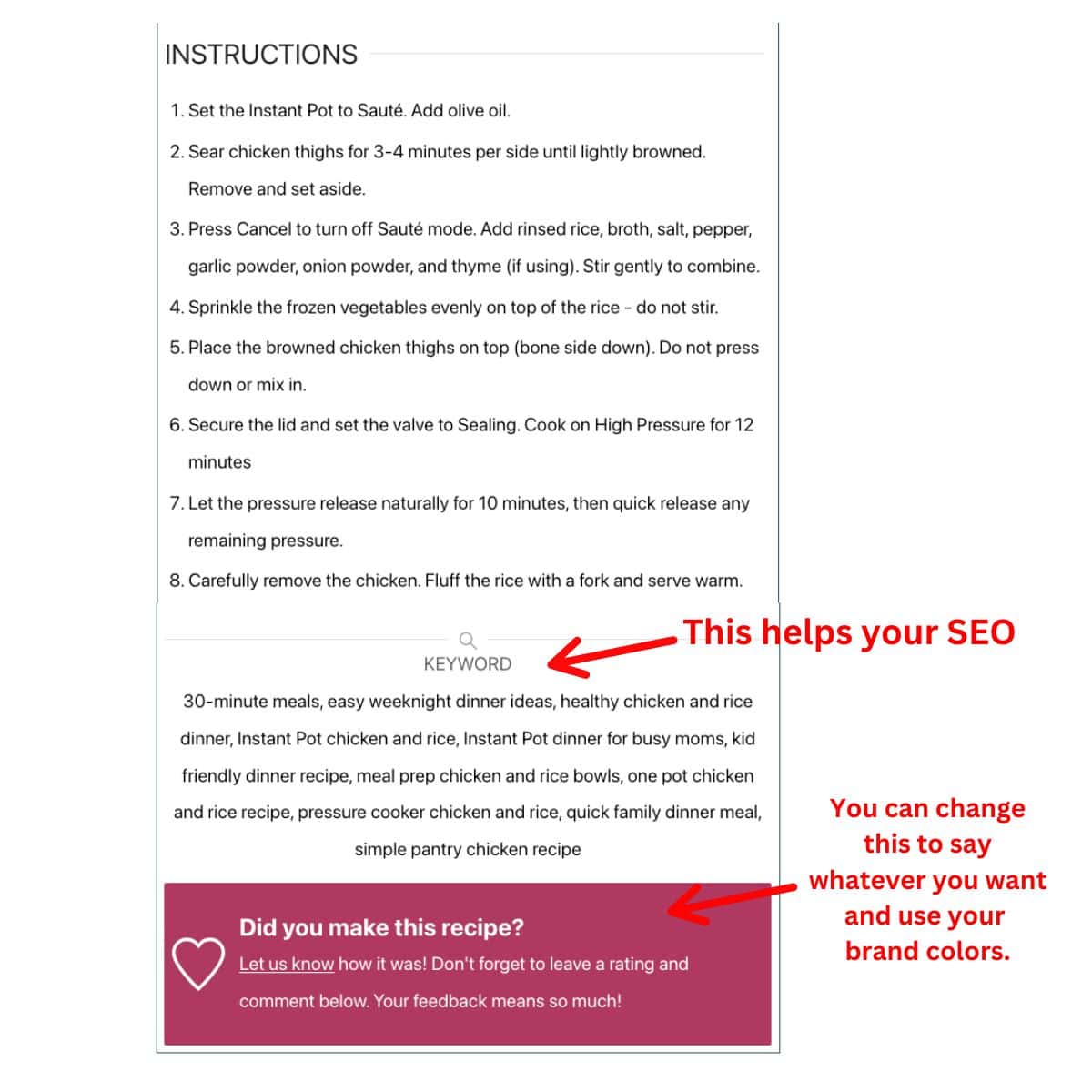
You can make the recipe card match your food blog branding without hiring a developer.
For me, this was important because I wanted my recipes to feel consistent and clean across the whole site.
3. Print Recipe Button
Every food blogger needs a good print recipe button.
WP Recipe Maker includes a clean print layout so readers can print just the recipe without your entire blog post.
This improves user experience and keeps readers happy.
4. Jump to Recipe Button
You can easily add a jump to recipe button at the top of your post.
Many readers do not want to scroll through the full story every time. This makes your content easier to use without hurting SEO.
5. Nutrition Information Support
You can manually add nutrition information or calculate it using built in tools. The free and premium bundles do not have automatic nutrition information. But, you can easily use ingredient and nutritional information calculators to find out those amounts and enter it manually. It is included in the Pro and Elite bundles.
For food bloggers in niches like gluten free, low carb, or macro tracking, this feature can be very helpful.
6. Ingredient Scaling
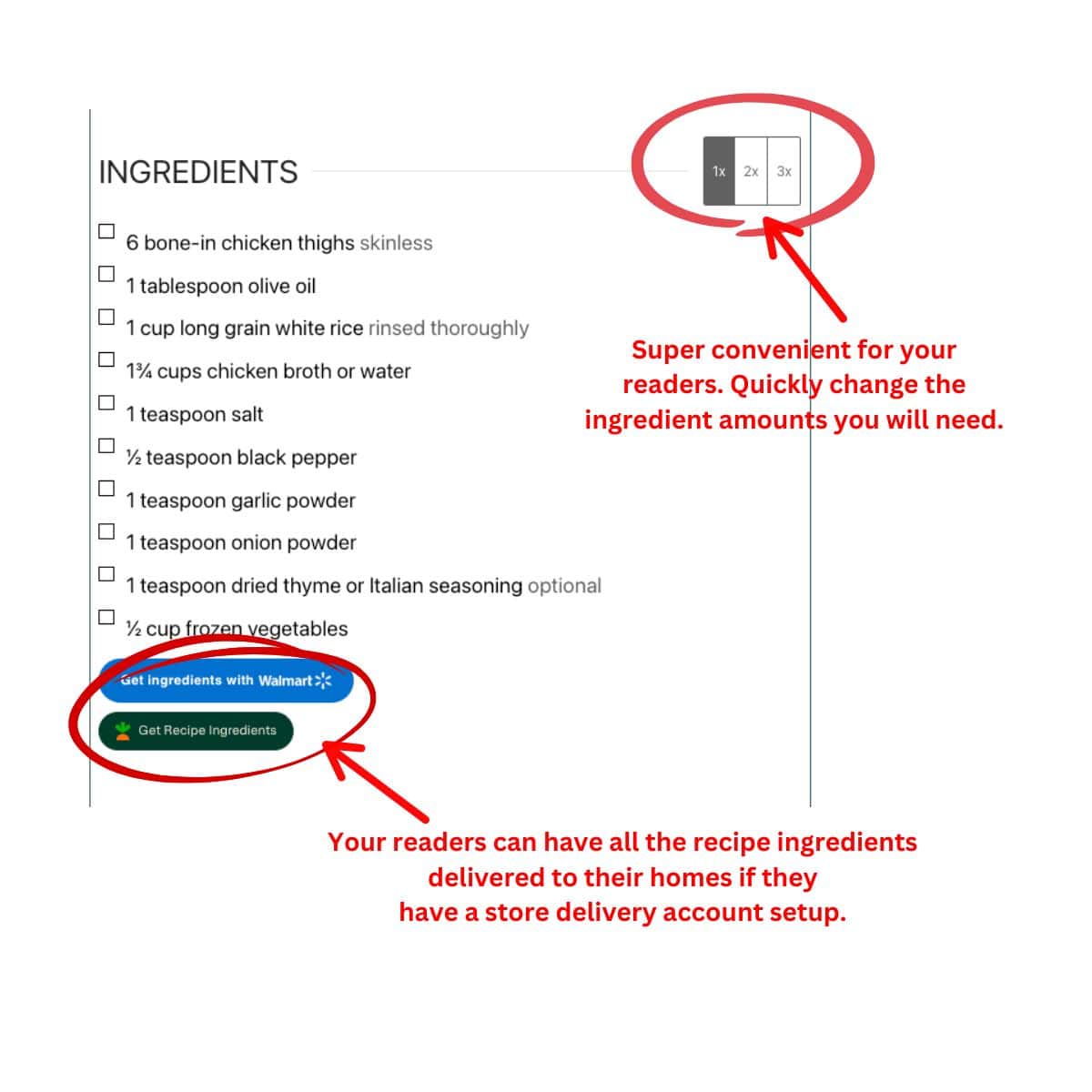
Readers can adjust serving sizes and the ingredient amounts update automatically.
This is one of those small features that makes your blog feel more professional.
7. Star Ratings and Reviews
You can allow readers to leave ratings on your recipes.
These ratings can also appear in search results if Google chooses to display them.
That social proof matters.
8. Easy Migration from Other Recipe Plugins
If you previously used another recipe plugin, WP Recipe Maker includes tools to import your old recipes.
This makes switching much less stressful.
For me, the biggest benefit was not just how the recipe card looked. It was knowing that every recipe on my site had proper schema markup and was structured in a way Google understands.
As a food blogger, that peace of mind is huge.
Pros and Cons of WP Recipe Maker for Food Bloggers
No plugin is perfect. And I think it is important to talk about what works well and what might not be for everyone.
Here are my personal thoughts after using WP Recipe Maker on my own recipe blog for one year.
What I Love about WP Recipe Maker
It automatically adds recipe schema
This is the biggest win for SEO. I do not have to think about structured data. I just fill in the recipe card and it handles the rest behind the scenes.
It makes my recipes look clean and consistent
All of my recipe cards follow the same format. That makes my blog feel more professional and easier to read.
The jump to recipe and print buttons work beautifully
Readers can skip straight to the recipe or print it without extra clutter. That small detail makes a big difference in user experience.
It supports ingredient scaling
When readers adjust serving sizes and the ingredient amounts update automatically, it makes my blog feel polished and modern.
It helps qualify for rich results in Google
Seeing those extra details in search makes your recipe more clickable.
It is beginner friendly
You do not need coding knowledge. If you can fill in a form, you can use this plugin.
What I Do Not Love about WP Recipe Maker
Not all levels are free
If you are brand new and still experimenting with blogging, the basic WP Recipe Maker is free. However, there are a few extras that I wanted when I got started, so I got the WP Recipe Maker Premium Bundle. This one costs $49/year. And, for some, that may be over-budget.
There is a small learning curve at first
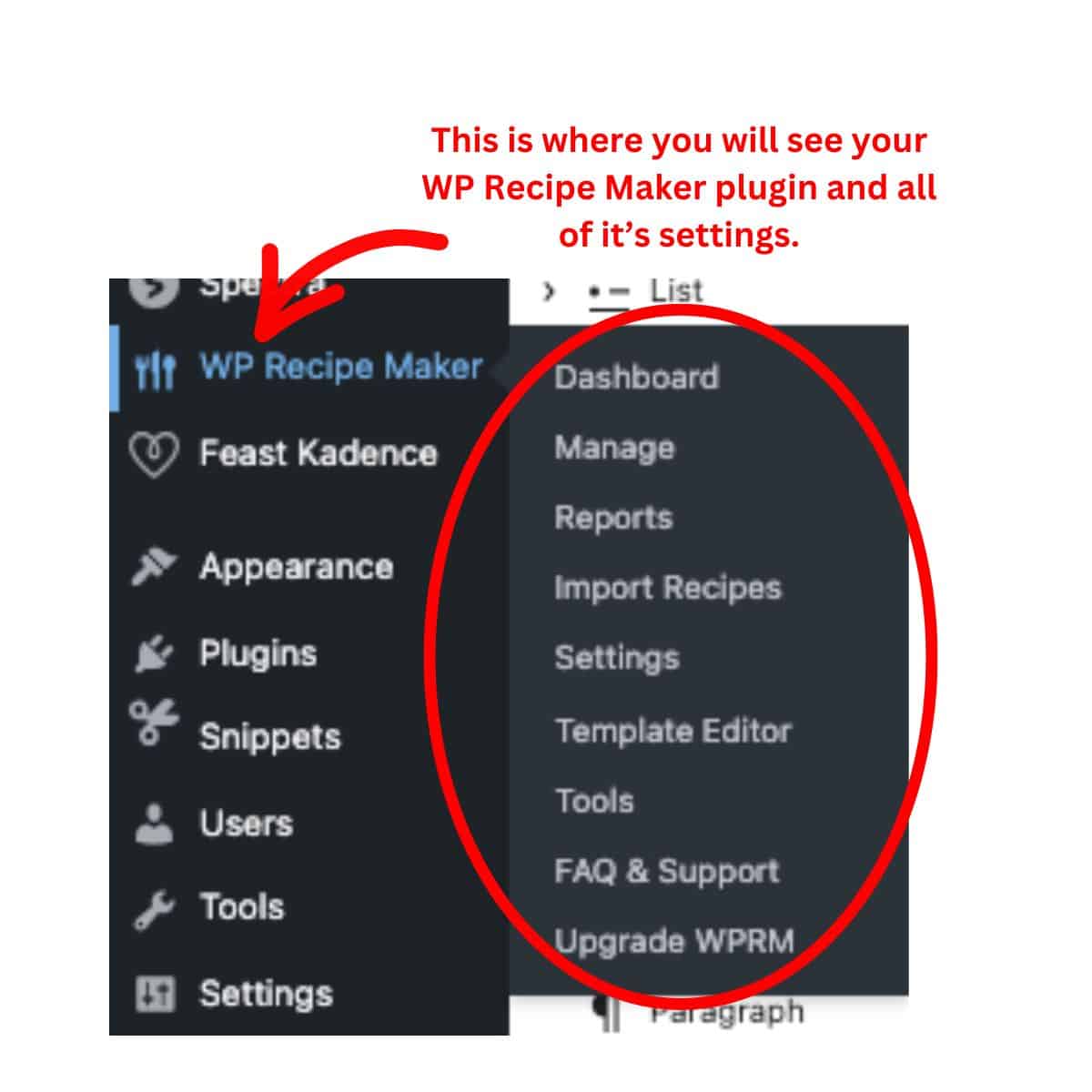
The settings panel has options. It is not overwhelming, but you will need to spend a little time getting comfortable.
Migrating from another recipe plugin can take time
There are tools to import recipes, but depending on your previous setup, you may need to double check formatting.
Design customization is flexible but not unlimited
You can change colors and layout, but if you want something extremely custom, you may need extra styling.
WP Recipe Maker Pricing: Which Bundle Makes Sense?
One thing I appreciate about WP Recipe Maker is that you can start small and upgrade as your blog grows.
Here is a simple breakdown of the four bundles and who they are best for.
Free Version
Best for: Brand new food bloggers who are testing the waters
The free version gives you:
• Basic recipe card layout
• Core recipe schema markup
• Simple ingredient and instruction formatting
If you are just starting your food blog and have fewer than 20 recipes, this can be enough to get going.
But most growing blogs outgrow the free version quickly because design options and advanced features are limited.
Think of this as your starter option.
Premium - $49 per year
Best for: Growing food blogs that want strong SEO foundations (This is the one I use.)
Premium is where things start to feel more professional.
You get:
• More recipe card design options
• Better control over structured data
• Improved SEO settings
• Ingredient linking
• More flexibility in formatting
If you are focused on Google traffic and want your recipes to qualify for rich results consistently, this is usually the sweet spot.
For many food bloggers, Premium is the most balanced option.
Pro - $99 per year
Best for: Established blogs with steady traffic
Pro includes everything in Premium plus more advanced features, including:
• Nutrition calculation tools
• Additional customization
• More powerful structured data options
If you are in a health focused niche like gluten free, keto, macro counting, or allergy friendly recipes, this can be worth it.
It gives you more control and flexibility as your blog becomes more serious.
Elite - $149 per year
Best for: High traffic food blogs and full time bloggers
Elite includes everything from Pro plus extra perks and extended support.
If your food blog is a significant income source and recipe traffic drives your business, this tier gives you peace of mind.
It is more about long term stability and support than basic features.
👉🏽 Compare WP Recipe Maker plans here
So Which Plan Should You Choose?
If you are brand new, start with Free.
However, if you are serious about growing traffic and competing in search results, Premium is usually the best value.
Additionally, if your blog is established and you want advanced features and flexibility, Pro makes sense.
And if blogging is your full time business, Elite gives you the most support and future proofing.
You can always upgrade later. You do not have to get the highest tier on day one.
That flexibility is one reason many food bloggers feel comfortable getting the WP Recipe Maker plugin.
Frequently Asked Questions About WP Recipe Maker
For food bloggers, WP Recipe Maker is one of the most popular recipe plugins for WordPress because it adds proper recipe schema, creates clean recipe cards, and helps qualify for rich results in Google. The best choice depends on your blog size and goals, but many growing food blogs choose WP Recipe Maker for its flexibility and SEO support.
WP Recipe Maker helps improve SEO by adding structured recipe schema markup to your posts. This allows Google to understand your recipe details like ingredients, cook time, ratings, and nutrition information. Proper schema increases your chances of appearing in rich results, which can improve click through rates.
Yes, small food blogs can start with the free version. If you have fewer than 20 recipes, the free plan may be enough. As your recipe library grows, upgrading to Premium or Pro can give you more customization and stronger SEO features.
Yes. When you create a recipe using the plugin, it automatically adds structured data for recipes behind the scenes. You do not need to code anything or understand schema markup. It handles it for you.
In most cases, yes. WP Recipe Maker includes migration tools to help import recipes from other recipe plugins. You may need to review formatting after switching, but it is designed to make the transition easier.
Yes. WP Recipe Maker includes a built in print recipe button that allows readers to print just the recipe card without the full blog post. This improves user experience and keeps your recipes easy to use.
If you publish recipes regularly, yes. A recipe plugin ensures your content includes structured recipe schema, proper formatting, and features like print buttons and ratings. Without a plugin, it is much harder to qualify for rich results in search.
Is WP Recipe Maker Worth It for Food Bloggers?
If you are casually posting a few recipes here and there, the free version may be enough for now.
But if you are serious about growing your food blog, improving your recipe SEO, and creating a better experience for readers, WP Recipe Maker is absolutely worth it.
As food bloggers, our recipe card is not just decoration. It is the part of our post that Google reads most carefully. Also, it's what helps us qualify for rich results. And, it's what makes our recipes printable, scalable, and easy to use.
Before using a proper recipe plugin, my posts felt less structured. Once everything was formatted consistently with recipe schema built in, my blog felt more professional and organized.
It did not magically explode my traffic overnight. No plugin can do that.
But it gave my recipes the structure they need to compete in search results.
If you have more than 30 to 50 recipes and you care about long term growth, investing in a solid recipe plugin makes sense.
But, if you are still in the early stages and building your content library, start with the free version and upgrade when you are ready.
For me, having a reliable recipe card plugin that handles structured data, print buttons, ratings, and formatting in one place gives peace of mind. And when you are already juggling photos, writing, and updating old posts, peace of mind matters.
If you want your food blog to feel organized, professional, and ready to grow, this is the kind of tool that quietly makes that happen.